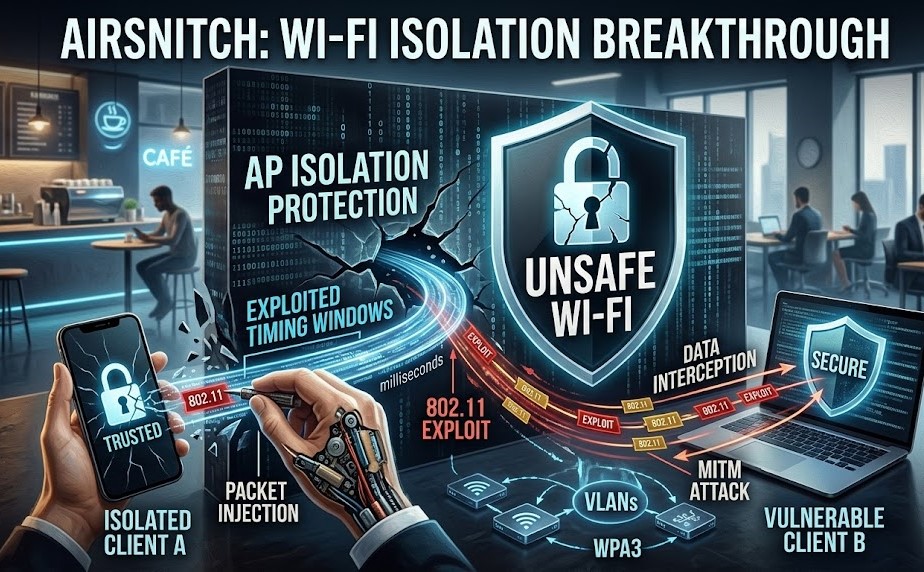
Introduction: The Security Barrier Under Siege
For nearly two decades, Client Isolation (or AP Isolation) has been the primary defense mechanism for public and shared Wi-Fi networks. It is the invisible wall that prevents your laptop from talking to the stranger’s tablet at the table next to you in a coffee shop.
However, security researchers have recently identified AirSnitch, a sophisticated vulnerability that systematically dismantles this protection. AirSnitch doesn’t just weaken the wall—it tricks the network’s access point (AP) into lowering the bridge entirely.
What is AirSnitch? (Featured Snippet)
AirSnitch is a wireless network vulnerability that exploits timing flaws in 802.11 client isolation protocols. By injecting specially crafted packets during specific handshake windows, an attacker can trick a wireless access point into treating isolated devices as trusted peers. This bypass allows for data interception, unauthorized device control, and man-in-the-middle (MITM) attacks on supposedly secure networks.
The Technical Breakdown: How AirSnitch Works
To understand AirSnitch, we must look at how APs manage traffic. When client isolation is enabled, the AP inspects every frame. If it detects a packet destined for a client within the same network, it drops the frame.
AirSnitch operates by attacking the logic gate of this inspection process. The technique uses a three-stage exploit:
- Probe Response Spoofing: The attacker monitors for the specific management frames an AP uses to maintain its internal client table.
- Timing Exploitation: By sending traffic in bursts precisely when the AP’s CPU is preoccupied with network load, the attacker creates a “race condition.” During this millisecond of lag, the AP fails to apply the isolation rule.
- Frame Injection: The attacker encapsulates malicious traffic inside frames that the AP erroneously marks as “infrastructure traffic” (trusted), effectively tunnel-routing the data past the firewall and directly to the target device.
Risk Assessment Table: Is Your Setup Vulnerable?
| Hardware/Network Type | Vulnerability Severity | Primary Risk Factor |
| Public Wi-Fi (Cafes/Airports) | Critical | High volume of unpatched APs |
| Home Consumer Routers | High | Lack of firmware updates |
| Small Business APs | High | Weak isolation logic |
| Enterprise-Grade WPA3 | Low | Robust frame protection |
| VLAN-Segmented Networks | Negligible | Layer 2/3 isolation logic |
Real-World Impact: Beyond Theoretical Risk
The AirSnitch vulnerability turns shared networks into “transparent” networks. If you are using a network at a library, hotel, or office that relies solely on AP isolation for security, consider the following real-world risks:
- Data Interception: An attacker can passively sniff traffic that was supposed to be restricted to the AP.
- IoT Hijacking: Many smart cameras and lightbulbs use weak Wi-Fi implementations. If an attacker bypasses isolation, they can interact with these local devices directly, potentially gaining a foothold into your home or office environment.
- Credential Theft: By redirecting traffic via an ARP spoofing attack—which AirSnitch now makes trivial—an attacker can prompt your device to send credentials to a malicious gateway instead of the legitimate site.
Hardening Your Defenses: What You Can Do
Because AirSnitch is an architectural flaw in how some APs process packets, fixing the issue at the hardware level requires manufacturer firmware patches. Until those patches arrive, you must implement a “Defense-in-Depth” strategy.
1. Immediate Protective Measures (User-Level)
- Always Use a VPN: A reputable VPN (Virtual Private Network) wraps your data in an encrypted tunnel. Even if an attacker uses AirSnitch to bypass isolation and “see” your traffic, they will only see encrypted garbage.
- Enable HTTPS Everywhere: Use browser extensions that force encrypted connections. This prevents basic packet sniffing from revealing clear-text URLs or login tokens.
- Update Your Drivers: If you use a laptop or mobile device, ensure your wireless adapter drivers are updated. Some OS-level updates are beginning to implement “isolation-agnostic” packet handling.
2. Network Configuration (Admin-Level)
- VLAN Segmentation: If you manage a small business or office network, do not rely on AP Isolation alone. Implement VLANs (Virtual Local Area Networks). Even if AirSnitch bypasses the AP’s internal filter, it cannot route traffic between different physical VLAN IDs.
- Disable WPS: Wi-Fi Protected Setup (WPS) is an ancient, insecure protocol. Disable it immediately. It provides attackers an easier secondary path to inject malicious frames.
- Switch to WPA3-Enterprise: If possible, upgrade your hardware to support WPA3. Its Management Frame Protection (MFP) makes the frame injection required for AirSnitch significantly harder to execute.
3. Advanced Network Monitoring
If you are managing high-security infrastructure, use network monitoring tools (such as Wireshark or IDS/IPS solutions) to watch for “unsolicited ARP replies” or “excessive probe requests.” These are the “heartbeat” of an AirSnitch attack and can be blocked by modern, alert-capable firewalls.
The Future of Wi-Fi Security Post-AirSnitch
The emergence of AirSnitch serves as a wake-up call for the Wi-Fi Alliance and hardware manufacturers. The industry’s heavy reliance on software-based isolation (which is vulnerable to CPU timing and packet injection) is clearly becoming unsustainable.
We expect a shift toward Hardware-Enforced Isolation. Future Wi-Fi chipsets will likely move the isolation logic into dedicated security silicon that operates independently of the main AP processor. This change would make it physically impossible for timing-based “race conditions” to occur.
Furthermore, we are likely to see the standardizing of “Zero-Trust Wireless,” where the network assumes that the connection between client and AP is already compromised. In this model, security is handled entirely by end-to-end encryption and device-level authentication, making the underlying Wi-Fi network purely a transport layer.
Conclusion: Vigilance is the Only Constant
AirSnitch proves that client isolation is a “soft” security feature. It is effective against accidental data leakage, but it is not a robust shield against a determined adversary.
Whether you are a casual internet user or a network administrator, the lesson is clear: Never trust the network. Treat every Wi-Fi connection—especially public ones—as if the person at the next table is monitoring your traffic. By combining technical fixes like VPNs and VLANs with a heightened awareness of network security, you can stay protected even as these vulnerabilities continue to emerge.
Stay informed, keep your firmware patched, and remember: security is a process, not a state of being.