What is WebMCP and Why It Matters
On February 10, 2026, the web took its biggest step toward becoming “machine-readable” since the invention of structured data. Google and Microsoft announced the early preview of WebMCP (Web Model Context Protocol), a browser-native API that allows websites to speak directly to AI agents.
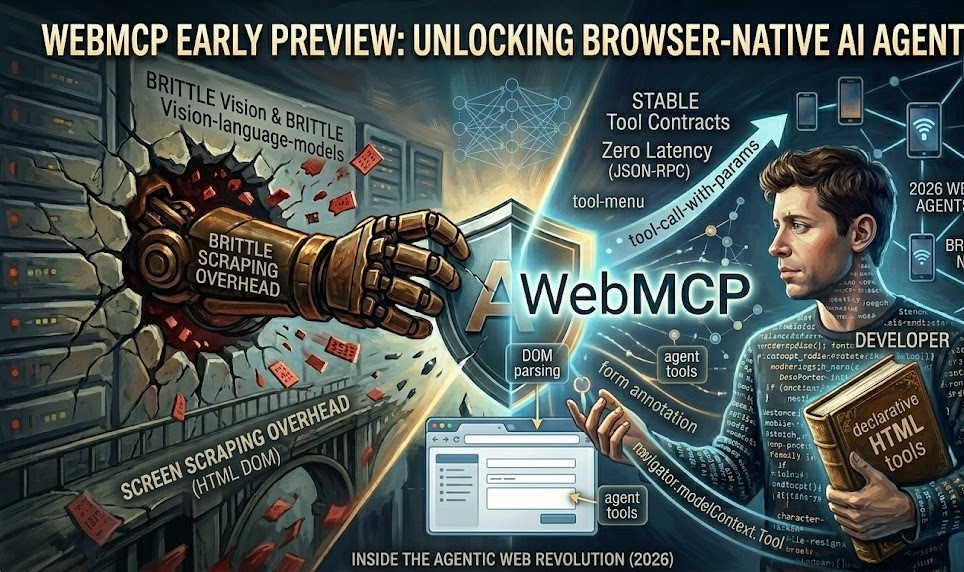
Until now, AI agents “used” the web like a human—by taking screenshots, parsing messy HTML, and guessing where the “Checkout” button was. This process is slow, expensive, and brittle. WebMCP changes the paradigm: instead of agents guessing what a button does, your website explicitly publishes a “Tool Contract.”
Featured Snippet Summary:
WebMCP is a 2026 web standard that exposes structured JavaScript tools directly to in-browser AI agents via the
navigator.modelContextAPI. Unlike Anthropic’s backend MCP, WebMCP runs entirely client-side, allowing agents to perform reliable actions likesearch_flightsorsubmit_ticketwithout screen scraping.
Key Features: Declarative vs. Imperative APIs
WebMCP introduces two distinct ways for developers to make their sites “agent-ready.”
1. The Declarative API (The No-Code Path)
For most sites, you don’t need to write a single line of JavaScript. By adding simple attributes to your existing HTML <form> elements, the browser automatically translates them into AI tools.
toolname: Defines the function name for the AI.tooldescription: Tells the AI when and why to use the form.toolautosubmit: Allows the agent to trigger the action once fields are filled.
2. The Imperative API (The Power-User Path)
For complex apps (like e-commerce filters or real-time dashboards), developers use the navigator.modelContext.registerTool API. This allows you to register full JavaScript functions as tools, complete with JSON Schema for input validation.
Technical Architecture: How WebMCP Works Under the Hood
WebMCP creates a “Machine Layer” that sits on top of your visual UI. When an AI agent (like a Gemini-powered Chrome extension) visits your page, it queries the Model Context Provider.
The Three Foundations of WebMCP
| Feature | Traditional Scraping | WebMCP (2026) |
| Data Source | Visual Pixels / Raw DOM | Structured Tool Contracts |
| Reliability | Breaks on UI updates | Stable across design changes |
| Efficiency | High Token Cost (Vision) | Low Latency (JSON-RPC) |
| Security | Hard to sandbox | Human-in-the-Loop default |
Early Preview Experience: Getting Started
As of March 2026, WebMCP is available in Chrome 146 Canary behind an experimental flag.
The Developer Checklist
- Download Chrome Canary: The standard build does not yet have the API.
- Enable the Flag: Search for
#webmcp-for-testinginchrome://flags. - Install the Inspector: Google has released a “Model Context Tool Inspector” extension to help you see and test your registered tools.
- Register Your First Tool: Use a simple character-level predictor or a search function.
Security and The “Human-in-the-Loop” Design
The most common fear regarding WebMCP is AI “taking over” a user’s session. The protocol includes built-in safeguards:
- Session Inheritance: Agents only have the permissions of the logged-in user.
- Explicit Interaction: For high-stakes actions like “Delete” or “Purchase,” the API includes
agent.requestUserInteraction(), which forces a browser popup for human confirmation. - Air-Gapped Safety: Because it runs client-side, sensitive tokens never have to leave the browser to be processed by a backend server.
Conclusion: Should You Build for WebMCP Today?
The shift to an agentic web is as significant as the shift to mobile-first indexing was a decade ago. If your business relies on users finding products, booking services, or filling out technical tickets, WebMCP is no longer optional.
By joining the early preview today, you ensure that when the “Agentic Search” wave hits mainstream Chrome and Edge users in late 2026, your brand is the most reliable one for AI to recommend.
Ready to turn your website into a set of AI tools? Start by annotating your primary search or contact forms with toolname attributes today.